Skill Evaluations Authoring
The Evaluation Template DSL Manual
Define tryout rubrics the way coaches think about the game — categories, skills, and scored metrics in one YAML document. Edit in the DSL editor with live preview; Apply DSL syncs the full template tree to your organization.
“If you can write a scouting checklist, you can author an evaluation template. The DSL is the checklist — the editor just validates it as you type.”
DSL building blocks
Every evaluation template is a four-level tree: template metadata, categories (position groups), skills (drill areas), and metrics (what coaches score).
Categories
Top-level groupings — Pitcher, Positional, Catcher, or any structure your program uses. Order in the YAML is the order evaluators see drills.
categories: - name: Pitcher skills: [...]
Position / role groups
Skills
Drill or competency areas within a category — Hitting, Infield, Pitch Speed. Each skill holds the metrics coaches score during that station.
- name: Hitting metrics: [Contact, Power, Plate Discipline]
Skill block syntax
Metrics & scales
What gets scored. Default is subjective 0–10. Use shorthand (just a name) or specify custom ranges and measured types for velocity, pop time, etc.
- Contact - { name: "Fastball Velocity", scale: "60-100", type: measured }
Shorthand vs custom scale
Live preview
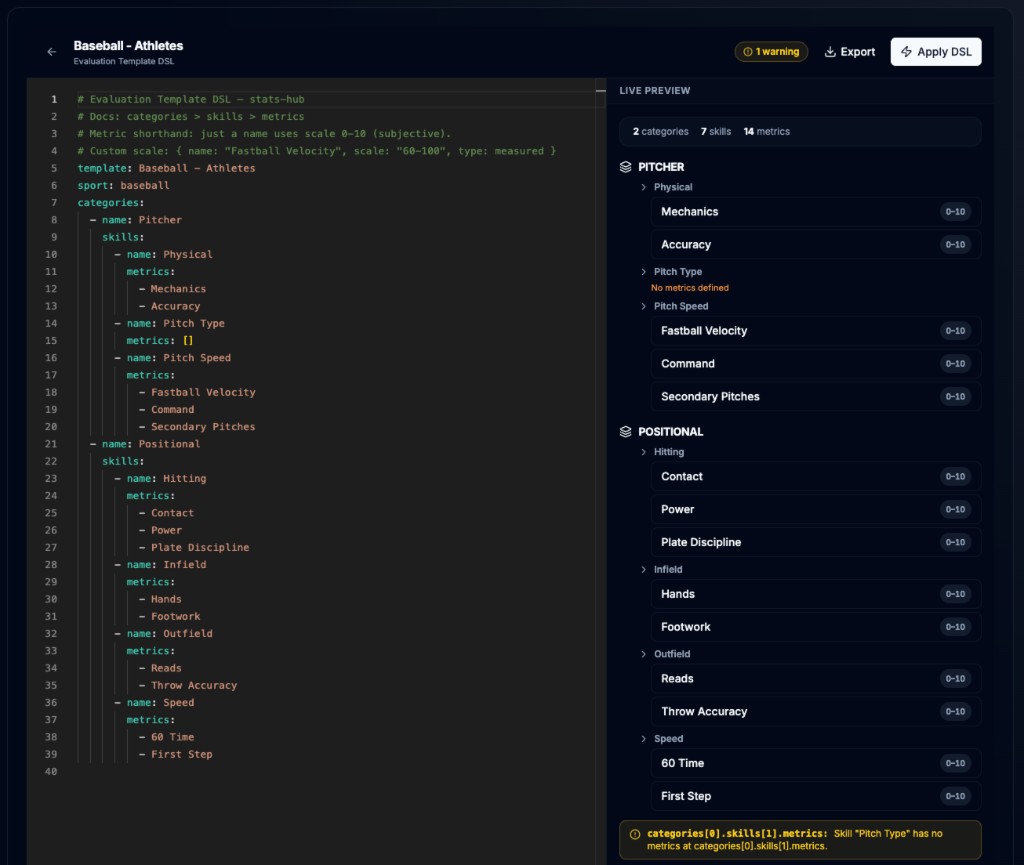
The editor parses YAML on every keystroke and renders a tree with category/skill/metric counts, scale badges, and inline diagnostics.
2 categories · 7 skills · 14 metrics
Real-time validation
Apply DSL
One click reconciles the YAML onto your database template — upserts by name, preserves IDs for metrics already used in events, guards deletions when scores exist.
POST /templates/[id]/apply-dsl
Name-based reconciliation
Agent-friendly
YAML is the lingua franca for AI assistants. Paste a generated rubric, export .eval.yaml for version control, or let an agent draft categories from a scouting sheet.
template: Baseball Tryout sport: baseball
Human + machine readable
From rubric to live tryout
The DSL editor in the screenshot above replaces dozens of form fields. One document defines everything coaches score on gameday.
Create or open a template
Go to Admin → Skill Evaluations → Templates. Create a preset (seeds Pitcher / Positional / Catcher) or open an existing template and click Edit DSL.
Author categories and skills
Structure your tryout stations as YAML. Each category is a position group; each skill is a drill area. Add skills under the right category — order matters for evaluator navigation.
Define metrics and scales
List metrics as simple names for standard 0–10 subjective scores. For measured values (velocity, 60 time), use scale: "min-max" and type: measured.
Validate and apply
Watch the live preview and fix any warnings (e.g. empty metric lists). Click Apply DSL to sync. If metrics with existing scores would be removed, the editor prompts for force-apply.
Attach to an evaluation event
Create an event, pick your template, assign players. Evaluators open the portal on their phones and score every metric you defined — no template changes mid-event.
Syntax reference
Tab through quick-start, grammar, metric scales, and a full baseball tryout example. Comments start with # — blank lines are ignored.
# Evaluation Template DSL — 60-second start template: Baseball Tryout sport: baseball categories: - name: Pitcher skills: - name: Mechanics metrics: [Delivery, Arm Slot, Balance] - name: Velocity metrics: - Fastball Velocity - Command
Ready to run tryouts with a rubric everyone understands?
Author templates in YAML, apply once, and let coaches score from their phones — same metrics, same scales, every evaluator.