Baseball IQ Authoring
The Baseball IQ DSL Manual
Write situational coaching scenarios the way you think about the game — frame by frame, player by player. Drag on the field or type in the editor; Stats Hub keeps Visual Builder and DSL in sync.
“If you can sketch a play on a whiteboard, you can author a Baseball IQ scenario. The DSL is the whiteboard — the Visual Builder is just faster.”
DSL building blocks
Every scenario is a sequence of frames. Each frame combines coaching copy with field actions — players, movement, throws, and highlights.
Frames & timing
A scenario is a timeline of frames. Each frame has a title, coaching instruction, display duration (ms), and optional final-state flag.
frame 2: title:"Coverage"; instruction:"Pitcher covers first"; duration:2800; final:true
Frame metadata syntax
Player placement
Drop defenders and runners on the diamond with normalized coordinates (0–1) or familiar anchors like home, first, and mound.
player:SS@(0.42,0.48)[color:"red"]
Position + optional color
Movement & throws
Show rotations, charges, and relays. Group multiple actors in one move statement; label throws on arrows.
move:1B,3B->home; arrow:C->first[label:"throw",color:"blue"]
Moves and labeled arrows
Highlights & zones
Circle or rectangle overlays draw attention to a bag, lane, or cutoff spot. Clear arrows or highlights between frames when needed.
highlight:circle@(0.74,0.62)[radius:0.07,color:"yellow",opacity:0.35]
Zone emphasis
Two-way sync
Edit visually and DSL updates live — or paste DSL and the canvas rebuilds. Canvas JSON is the source of truth; the serializer keeps diffs stable.
parse → serialize → parse yields equivalent frames
Deterministic round-trip
Starter templates
Bunt coverage, pickoffs, cut-off relays, and steal defense ship as copy-paste templates. Insert, tweak coordinates, publish.
@sport baseball
Sport directive (first line)
From whiteboard to published scenario
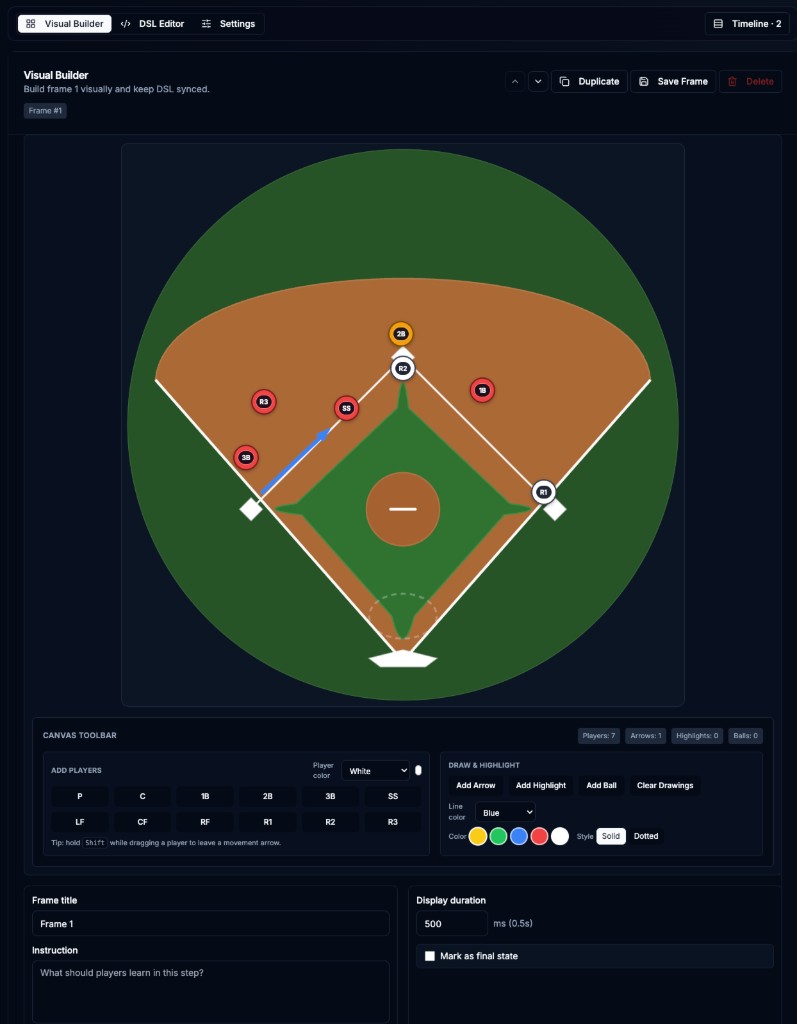
The Visual Builder in the screenshot above is the fastest path; the DSL is there when you need precision, bulk edits, or agent-assisted authoring.
Open the scenario editor
Go to Admin → Baseball IQ → New scenario (or edit an existing one). Pick Visual Builder for canvas work or DSL Editor for text-first authoring.
Build frame 1 — the setup
Add players from the toolbar (P, C, 1B, 2B, 3B, SS, LF, CF, RF, R1–R3). Set the frame title, instruction players should read, and duration in ms. Tip: hold Shift while dragging a player to leave a movement arrow.
Add motion and teaching cues
Use Add Arrow for throws and reads; Add Highlight to spotlight a base or lane. Each frame can stack multiple actions separated by semicolons in DSL.
Sequence frames on the timeline
Duplicate frames to iterate quickly. Mark the last frame as final state when the play resolves. Preview the full animation before publishing to the marketplace.
Publish for your program
Save the scenario and share the public link. Players work through frames at their own pace while coaches reuse the same DSL for consistent teaching language.
Syntax reference
Tab through quick-start, grammar, actions, and a full multi-frame example. Comments start with # — blank lines are ignored.
# Baseball IQ DSL — 60-second start @sport baseball frame 1: title:"Setup"; instruction:"Read the situation"; duration:3000; player:P@(0.5,0.65); player:C@(0.5,0.86); player:1B@(0.74,0.62); player:3B@(0.26,0.62) frame 2: title:"React"; instruction:"Corners crash, pitcher covers"; duration:2500; move:1B,3B->home; move:P->first; arrow:C->first[label:"throw"]
Ready to teach the game beyond the box score?
Author scenarios in the Visual Builder, refine in DSL, and publish to your program’s Baseball IQ library.